
Download Mem0 – Open‑Source AI Chatbot Framework for Secure, Scalable LLM Development
Overview of Mem0: An Open‑Source AI Chatbot Framework
Mem0 is a cutting‑edge, open‑source framework that empowers developers to build large‑language‑model (LLM) powered chatbots using any dataset they choose. Hosted on GitHub, Mem0 invites contributions from a global community, fostering rapid iteration and continuous improvement. Its core promise is to give AI agents a “memory” – the ability to retain context across conversations, retrieve relevant facts from custom knowledge bases, and adapt responses on the fly.
Because the project lives under the permissive Apache‑2.0 license, organizations can adopt it for commercial or internal use without worrying about licensing fees or restrictive clauses.
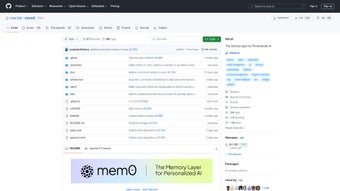
The repository is organized into clear directories: config holds environment and model settings, docs offers extensive tutorials, examples provides ready‑to‑run chatbot templates, and tests ensures reliability through automated CI pipelines. This structure not only accelerates onboarding for new contributors but also serves as a living documentation hub where issues, pull requests, and discussions are publicly tracked.
While Mem0 shines in flexibility and community‑driven development, it does rely heavily on GitHub for version control and issue management, and it currently lacks sophisticated intent‑recognition modules found in some commercial platforms. Nonetheless, for teams looking to craft bespoke, memory‑enhanced AI assistants without licensing overhead, Mem0 stands out as a secure, extensible, and free solution.
In practice, developers have used Mem0 to power internal help desks, knowledge‑base assistants, and even educational tutoring bots.
Its modular architecture separates the language model inference layer from the memory persistence layer, enabling a plug‑and‑play experience where you can swap a hosted OpenAI model for a self‑hosted Llama instance without rewriting business logic. Security‑focused teams appreciate the built‑in secret management that forces API keys into environment variables and encourages encrypted storage when deployed on cloud providers. The active community contributes plugins for vector‑search retrieval, custom ranking algorithms, and multi‑tenant session handling, making Mem0 a living ecosystem rather than a static code dump.
Whether you are a solo developer prototyping a hobby project or an enterprise engineering squad building a customer‑service chatbot, Mem0 provides a solid foundation that scales with your ambition.
Key Feature List
- Memory‑augmented conversation handling for persistent context.
- Plug‑and‑play support for any LLM (OpenAI, Anthropic, Llama, etc.).
- Dataset‑agnostic training – import CSV, JSON, SQL, or custom APIs.
- Built‑in CI/CD pipelines using GitHub Actions for automated testing.
- Extensible plugin system for custom retrieval, ranking, or routing logic.
- Comprehensive documentation with step‑by‑step tutorials.
- Open‑source Apache‑2.0 license ensures free commercial use.
- Community‑driven issue tracker and pull‑request workflow.
- Dockerized deployment options for cloud‑agnostic scaling.
- Secure token handling and environment variable management.
Installation, Usage Instructions, and Compatibility
Getting started with Mem0 is straightforward for developers familiar with Python and Git. First, clone the repository from GitHub:
git clone https://github.com/mem0-framework/mem0.git
cd mem0
The project relies on Python 3.9 or newer and a virtual environment to keep dependencies isolated. Create and activate a virtual environment, then install the required packages:
python -m venv venv
source venv/bin/activate   # On Windows use `venv\Scripts\activate`
pip install -r requirements.txt
Mem0 ships with a .env.example file that outlines necessary environment variables such as LLM_API_KEY, MEMORY_BACKEND, and optional DATABASE_URL. Copy this file to .env and replace placeholder values with your own credentials. The framework supports a variety of back‑ends for memory storage, including SQLite, PostgreSQL, and Redis, allowing you to match the solution to your infrastructure.
Once configured, launch the development server with a single command:
python run.py --mode dev
The web UI becomes available at http://localhost:8000, where you can interact with a sample chatbot, upload your own dataset, and experiment with memory settings in real time. For production deployments, Mem0 provides Dockerfiles and Kubernetes manifests. Building a Docker image is as simple as:
docker build -t mem0:latest .
docker run -d -p 8000:8000 --env-file .env mem0:latest
If you prefer a Kubernetes‑native workflow, the k8s/ directory contains a Helm chart that automatically provisions a StatefulSet for Redis, a ConfigMap for environment variables, and an Ingress resource for external traffic. The chart also supports autoscaling based on CPU usage, making it easy to handle spikes during peak conversational loads.
Compatibility – Mem0 is designed to be OS‑agnostic. It runs natively on Windows 10/11, macOS (Catalina and later), and major Linux distributions such as Ubuntu, Debian, and Fedora. The Docker approach further abstracts the underlying OS, making it easy to deploy on cloud providers (AWS, GCP, Azure) or on‑premise servers. The itemprop="operatingSystem" attribute below lists the officially supported platforms:
- Windows 10/11 (64‑bit)
- macOS Catalina (10.15) and later
- Ubuntu 20.04 LTS and later
- Debian 11 and later
- Fedora 34 and later
- Docker‑compatible environments (any OS)
After installation, developers can extend Mem0 by creating custom retriever modules, integrating third‑party APIs, or adding new UI components. The documentation includes a “Create Your First Plugin” guide that walks through the process step by step, ensuring that even newcomers can contribute meaningful enhancements within a few hours. Troubleshooting tips cover common pitfalls such as missing environment variables, GPU driver mismatches, and rate‑limit errors from external LLM providers, helping you keep the development pipeline smooth and reliable.
Pros and Cons of Mem0, Followed by Frequently Asked Questions
Pros
- Fully open source – no licensing fees, free for commercial use.
- Memory‑enhanced chat capabilities outperform stateless bots.
- Highly extensible – plug in any LLM or custom retrieval engine.
- Strong community support through GitHub issues and pull requests.
- Docker and Kubernetes support simplify cloud deployment.
- Clear documentation with example projects for rapid onboarding.
- Secure handling of API keys via environment variables and optional secret managers.
- Modular architecture separates inference from storage, enabling easy scaling.
Cons
- Relies on GitHub for version control; offline teams need a mirror.
- Missing out‑of‑the‑box advanced intent classification (requires custom plugins).
- Initial setup can be intimidating for non‑technical users.
- Performance depends on the underlying LLM and hardware resources.
- Community‑driven roadmap may shift priorities, requiring active monitoring.
Frequently Asked Questions
Is Mem0 really free for commercial projects?
Yes. Mem0 is released under the Apache‑2.0 license, which allows unlimited commercial use, modification, and distribution without paying royalties. You can embed the framework in a SaaS product, sell a customized version, or integrate it into internal tools without any licensing complications.
Which large language models can I integrate with Mem0?
Mem0 is model‑agnostic. You can connect OpenAI GPT‑4, Anthropic Claude, Meta Llama, Cohere, or any self‑hosted LLM that offers an API endpoint compatible with the framework’s client interface. The plugin system also lets you add custom adapters for emerging models without touching the core code.
Do I need a GPU to run Mem0 locally?
A GPU is recommended for inference with large models (e.g., GPT‑3.5 or Llama‑13B) to achieve real‑time response times. However, smaller models or API‑backed services can run on CPU‑only machines. Mem0 automatically detects CUDA availability and falls back to CPU if no compatible GPU is found.
Can Mem0 store conversation history across sessions?
Yes. The built‑in memory backend persists context in a configurable datastore (SQLite, PostgreSQL, or Redis), allowing bots to recall prior interactions even after a server restart. You can also customize the retention policy to purge old conversations after a defined period.
How does Mem0 handle security of API keys and user data?
All secrets are loaded from a .env file and never hard‑coded. The framework follows best practices for environment variable handling and supports encrypted secret stores when deployed on cloud platforms. Data transmitted between the UI and backend uses HTTPS, and you can enable additional encryption at rest for the chosen memory backend.
Is there a way to automate updates and CI/CD for Mem0?
Yes. Mem0 includes ready‑made GitHub Actions workflows that run linting, unit tests, and integration tests on every pull request. You can also configure a release pipeline that rebuilds Docker images and pushes them to a container registry whenever a new tag is created, ensuring that production deployments stay up‑to‑date with minimal manual effort.
Mem0 delivers a powerful, community‑driven foundation for building memory‑rich AI chatbots. Its open‑source nature, extensive plugin system, and robust documentation make it a compelling alternative to proprietary platforms. While the learning curve may be steep for non‑technical stakeholders, the long‑term flexibility and zero licensing cost provide significant upside for startups and enterprises alike. The framework’s pros include unrestricted commercial use, modular architecture, and strong security practices; its cons revolve around the need for technical setup and the absence of out‑of‑the‑box intent classification. Overall, the benefits outweigh the drawbacks for teams that value control and extensibility.
Conclusion – Why You Should Download Mem0 Today
In a landscape saturated with closed‑source chatbot services, Mem0 shines as a transparent, adaptable, and free framework that puts control back in the hands of developers. Its memory‑enhanced architecture ensures that conversational agents can retain context, retrieve domain‑specific knowledge, and deliver more natural interactions. The extensive feature set—from model‑agnostic LLM support to Dockerized deployment—means you can tailor the solution to any scale, whether you’re prototyping a hobby project or launching an enterprise‑grade support bot.
By choosing Mem0, you gain immediate access to a vibrant GitHub community, continuous CI/CD pipelines, and a permissive license that eliminates hidden costs. The only trade‑off is the need for some technical setup, but the comprehensive guides and example projects dramatically reduce that friction. If you value security, extensibility, and the freedom to innovate without licensing constraints, Mem0 is the logical choice.
Ready to start building smarter chatbots? Download Mem0 now, follow the quick‑start guide, and join the community of contributors shaping the future of conversational AI.



.png)



